Dear User, If you have any questions regarding installation or registration of ECTACO software, you can download the following instructions or read the notes to them.

Partner® Palm™ OS Dictionary installation and registration [ Download Now Download in zip 174KB ]

Partner® Pocket PC Accent Remover Dictionary installation and registration [ Download Now Download in zip 201KB ]

Partner® Pocket PC Dictionary installation and registration [ Download Now Download in zip 215KB ]

Partner® Pocket PC Voice Translator installation and registration [ Download Now Download in zip 160KB ]

Partner® Dictionary for Windows® installation and registration [ Download Now Download in zip 162KB ]


How to register Palm OS dictionary?

To register your dictionary follow the steps:

  1. Start menu -> setup / info -> register or restart your dictionary
  2. Enter the registration code in the appropriate field and press OK

Click here to purchase your dictionary and get the registration code


How to register Pocket PC dictionary or voice translator?

You should restart your application and the registration dialog will appear.

Enter the registration code into the appropriate field.

Click here to purchase your dictionary and get the registration code


How to register your dictionary for Windows?
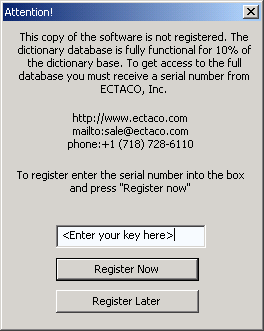

You should restart the dictionary and the registration dialog will appear.

Enter the registration code into the appropriate field.

Click here to purchase your dictionary and get the registration code


???register_your_copy.download_a_trial_registration_header???

???register_your_copy.to_get_the_registration_information??? ???register_your_copy.to_proceed_with_your_order???